The improved format has smaller footprint, which enables faster loading on target devices.
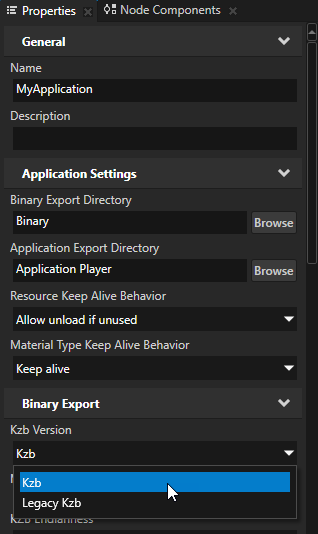
This improved format is the default format for all new projects you create in Kanzi Studio, but the legacy format is still available. To set which format you want to use, open a project in Kanzi Studio, in the Project menu select Properties, and in the Properties set the Kzb Version property to the version you want to use. If you want to use the improved kzb format in a Kanzi application you created with an earlier version of Kanzi Studio, export the kzb file from that project and if you manually load content from a kzb file, update the application code to use the API of the improved format.
Lazy memory mapping is now by default used on QNX.
You can configure the input event devices that Kanzi listens to on Linux ports where the native windowing system does not provide input device handling. See Input event devices on Linux.
Kanzi Studio now includes the application.cfg file in the apk when you create the apk from Kanzi Studio.
When you use more than one Animation Player in a node, you can now pause, resume, start, or stop a specific Animation Player on that node by setting the name of the Animation Player in the message. See Controlling keyframe animations.
Node components now filter incoming messages and handle only those whose name in the message matches the name of the component.
The default blending mode is now Premultiply Alpha.
You can now use custom brushes in Kanzi Studio.
Improved the Project Merge dialog. The dialog now:
Shows only the differences between projects you are merging. See Merging projects.
Shows the URL of both target and source projects.
Improved merging of 3D assets:
You can now merge splines from fbx files.
In Kanzi Studio you can now use the Asset Merge dialog to merge content from 3D assets.
Performance HUD now shows triangle count.
Several Kanzi Studio usability improvements, such as:
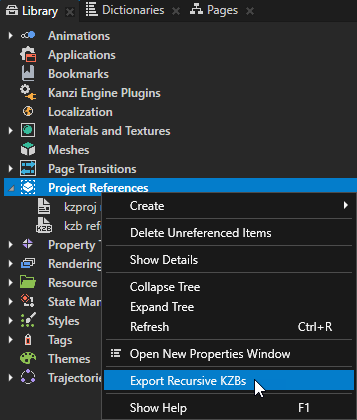
You can now export recursively kzb files from all referenced projects in a project which refers to multiple projects.
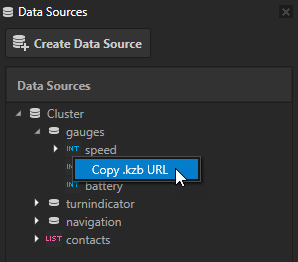
You can now copy kzb URL of data objects in a data source. You can readily use these URLs in your application code.
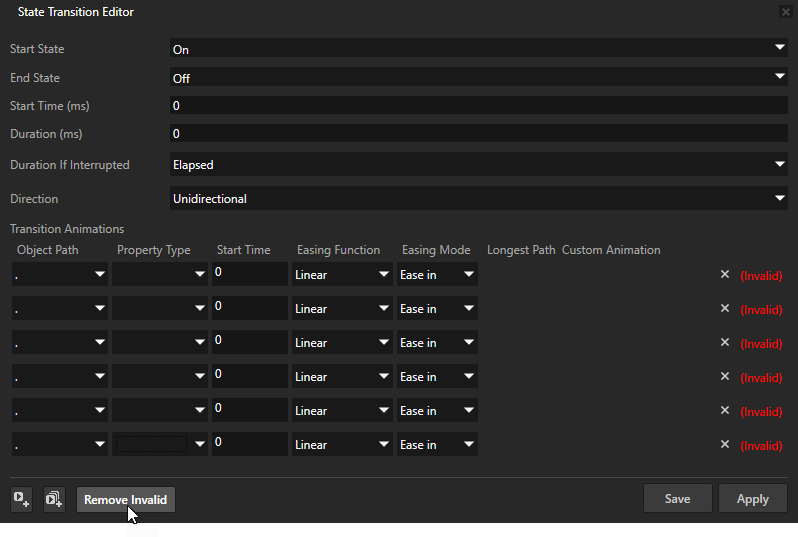
You can now remove at once all invalid animations from a state transition.
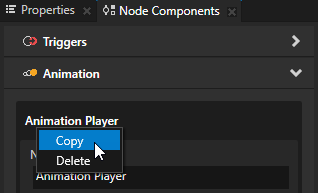
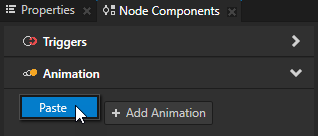
You can now copy and paste the items in the Node Components between nodes.
Improved the diversity of resource icons in the Library and improved the color contrast for some items listed in the Properties to improve readability.
When you import a mesh that uses skinning, Kanzi Studio now sets the Material property of the mesh clusters to VertexPhongSkinnedMaterial.
When you import a morph object, Kanzi Studio now sets the Morph object to use the VertexPhongMorph material type.
Changes
When you export kzb file from your project, Kanzi Studio creates a txt file which contains the names of nodes, resources, and files that the project uses. You can set the exporting of this txt file in the Kanzi StudioUser Preferences. See Using kzb files.
Kanzi Studio now sets the size of Empty Node 2D nodes it creates from group layers imported from psd files to the size of the imported element boundaries.
When you make a change to a Kanzi Studio plugin you must restart Kanzi Studio to take that change into use.
If you now add a Click Enabled property to a Button node, Kanzi Studio prints a warning, because the Click Enabled property is not meant for Button nodes.
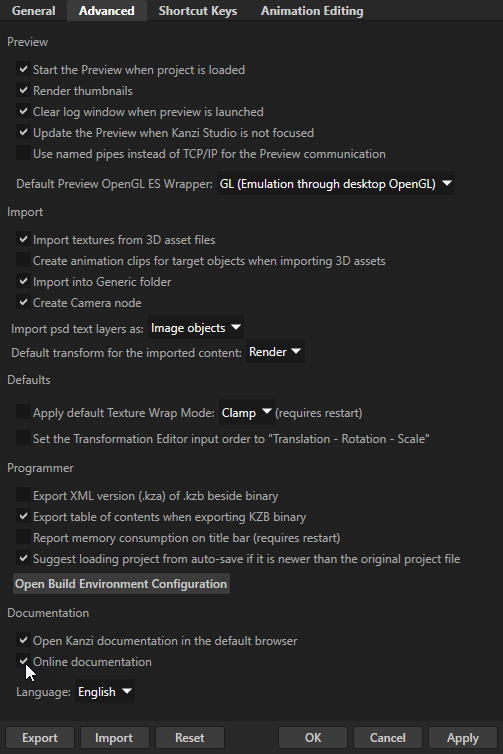
Kanzi documentation is now hosted at docs.kanzi.com where you can read the latest version. To access Kanzi documentation at docs.kanzi.com you need a Rightware Zendesk account. If you do not have one already, you can create it when you access Kanzi documentation the first time. Kanzi Studio takes you to docs.kanzi.com by default, but when you have a slow or no Internet connection, you can still read the documentation that comes with your installation of Kanzi. If you prefer either one, in Kanzi Studio you can select which one you want to use in the Edit > User Preferences > Advanced tab with the Online documentation property.
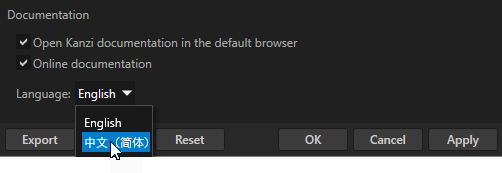
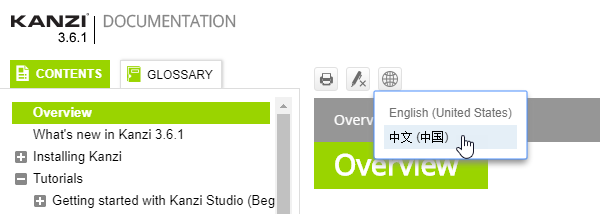
You can now read the Kanzi documentation in Chinese (欢迎我们的中文读者). In Kanzi Studio you can select the default language in the Edit > User Preferences > Advanced tab with the Language property or in the documentation click in the header of each topic and select the language.
Fixes
When receiving an invalid UTF-8 character Kanzi Engine now displays a replacement character.
2D nodes no longer react to stencil settings from the previously executed render pass. Stencil settings for 2D nodes are disabled.
Interrupted Page and Page Host node transitions no longer leak memory.
Kanzi now correctly applies the ETC2 texture compression.
Kanzi now correcty applies the ATC texture compression.
Kanzi now correctly renders PNG images that have fewer than 24 bits and contain an alpha channel.
Kanzi applications no longer terminate when they receive a large amount of touch events.
Kanzi now correctly recalculates the size of a Stack Layout 2D node when the size of its child nodes change.
Kanzi no longer drops touch events on applications running on Wayland.
Fixed the drag and drop manipulator.
The suspension manager now works with Instantiator nodes.
2D nodes now no longer react to stencils.
Kanzi Studio now stays responsive when a Kanzi Engine plugin in a project contains a large amount of property types.
Reduced the Lightness (L) and Blend Intensity of materials in the Materials, textures, and rendering tutorial to get a more realistic rendering result.
Kanzi Studio now takes only positive values for the Start Time property in state transitions.
Image nodes no longer flicker in the Kanzi StudioPreview when their Opacity property has values less than 1.
After setting focus to a Button node using scripting, the clearFocus() function now actually removes it.
When you activate a Page Host node, the node now sends the Message.Page.Activated message only once.
Undocking and docking the Preview no longer mangles the layout of Flow Layout 2D nodes.
Three-way merge now correctly resolves some conflicts it did not resolve previously.
When a project uses a resource from a missing referenced project, Kanzi Studio now starts and prints an error to the Log.
Kanzi Engine plugin properties targeting nodes now have < Relative > available in the default editor.
The Project Item custom property types now have < Relative > available when you use them in your project.
The Snap tool in the Preview now stays off when you switch it off and in general works the way it is intended to work.
When an imported scene does not contain a camera, Kanzi Studio now adds one.
Kanzi Studio now issues a message when you try to import an image whose name differs only in letter case.
The Mesh Attributes Editor no longer independently sorts the Import and Export sections.
Zero-width characters no longer affect the character spacing.
When you create a project with Kanzi Engine plugin template, Kanzi now replaces in the application code files the CUSTOM_COMPONENT_API with the <ProjectName>_API.
You can now delete the folders you create manually in the Library > Property Types library.
The Current Time field in the Animation Clip Editor now correctly displays current time even when you stop an animation clip or select the field.
You can now create a Prefab Placeholder 3D and a Prefab View 3D node under a Viewport 2D node.
Now when you want to undo creating of a state in State Tools it suffices to press CtrlZ only once.
After enabling the Double-Click Enabled property you no longer have to restart the Preview to enable the double clicking for that node.
If your display resolution is too low to show the entire Create context menu, Kanzi Studio now allows you to scroll the menu.
Removed the glitches that Node tool had when selecting multiple items under layout nodes.
The Preview now correctly draws the Allocated layout.
The Hold Interval on Button now works correctly.
When you close or shut down the Virtual list box example while it is still loading images, the example no longer terminates.
Kanzi Studio now correctly builds apk even when you change the Build Debug Version property in an application configuration in the Library > Applications.
Kanzi Studio now shows the content of referenced projects even if you open them before opening the project which refers to these projects.
The Preview no longer terminates when you export the kzb file from a referenced project while the Preview of the project which refers to it is still running.
The Preview no longer terminates when you use a script to move focus from a node to the Screen node and back to the same node.
Kanzi Studio no longer creates a new texture when you import an image that you already imported and decide to overwrite the already imported image file.
Kanzi no longer removes the first _ (underscore) character from custom trigger names.
You can now use the FontDefault material for Text Block 2D nodes.
Calling eglGetCurrentContext() before activating a context now returns a warning.
In animation action configuration settings you can now set the Target Item to any node in the Project.
Kanzi Studio now correctly applies the Trajectory Override Offset property only to the child nodes of a Trajectory Layout node.
Modified the shaders for the Factory ContentChrome Material, Carbon Fiber Material, and Glass Material to correct errors.
Aligned the precision of the BlendIntensity uniform in VertexPhong shaders.

 in the header of each topic and select the language.